Influencer Page – Tom Ferry

Discover BoldTrail, the Next Generation of kvCORE and BoomTown

Propel your business forward → we have a solution for every need.

Tom Ferry

Partner with a real estate technology solution recommended by Tom and unlock next-level growth for your business. Whether you’re a single agent, a team, a brokerage, or a multi-state enterprise, we have the insights, tools, and innovation you need in one seamless ecosystem.

Request a demo and find the right solution for you!

Inside Real Estate uses the information you provide us to bring you relevant real estate content, products, and services. You may unsubscribe from these communications at any time. For more information, check out our Privacy Policy.

BackOffice Demo Days – 2024 TEST

BackOffice Demo Days: Introducing BoldTrail

Speaker: Andy Hay
Account Executive with BackOffice

The next generation of Brokermint is here. Meet BoldTrail BackOffice.

Date: Thursday, June 27, 2024
Time: 8:00am PT (11:00am ET)

BoldTrail: A Bold New Brand for the Future

Meet BoldTrail, the next generation of kvCORE, Brokermint Solutions, and AmpStats. Bringing all our capabilities together into one seamless ecosystem, BoldTrail unites our extensive product portfolio under one dynamic brand. This powerful set of products and thriving community, provides all the insights, tools, and innovation you need to personalize your platform, differentiate your business, and scale success.

Register for the Webinar!

We use the information you provide us to present to you this webinar and bring you relevant real estate content, products, and services. You may unsubscribe from these communications at any time. For more information, check out our Privacy Policy.

Innovation Pathways

Innovation Pathways are designed to facilitate a seamless transition from BoomTown to BoldTrail and BoldTrail Pro

These pathways are unique to you as an existing BoomTown client, with consideration for individual business needs, goals, and structure to ensure that you are set up for success with your new Inside Real Estate platform.

Check out the process overviews, FAQs, and more below!

Your Team of Experts

Implementation Team

These are the representatives who handle setting up your new account, from MLS and IDX feeds to website, CRM, and more! They’ll be your first point of contact throughout this process, here to help ensure your Innovation Pathway is easy and streamlined.

Billing

We know transitioning to a new platform can have its quirks, so the Billing team is here to help answer any bill-related questions you have as you navigate through your Innovation Pathway. You can reach them at billing@insiderealestate.com.

Implementation Timeline Overview

Let’s quickly review the implementation timeline for your Innovation Pathway:

Within 2-3 business days of signing your contract, we will send over an email to explain next steps. You’ll find a link to schedule your kick-off call with our implementation team in this email!

IDX access will be established

You will need to confirm your MLSs with us as part of the post-contract follow-up. From there, we will initiate the IDX process.

Leads360 Add On

User accounts and logins will be set up

User accounts will be created on your new platform automatically. We will share your admin login and password shortly after.

We’ll connect

We’ll discuss getting your new account set up for success, from your MLSes to your website to your users and more! We can’t wait to speak with you.

Your new website will be created

Your new website will reuse most of the information that was gathered to initially set up your BoomTown website. We will discuss options for any additional content you may want to recreate on the kickoff call.  

Because we love you! We will provide access to your BoomTown website and custom pages that were created, behind a login so you can access information to recreate it on your new site.

Your MLS(s) are ready to connect to your site

There is nothing for you to do at this point! MLS approval is a required step to launch so this will just mean we are almost ready to take your new site live 🙂

Let’s get you launched!

We will schedule a call with you to connect the last pieces to take your new site live as well as answer any outstanding questions. Don’t worry though – we won’t go live without your approval first!

All systems go!

When your platform is ready, all you will need to do is send your agents an automated welcome email.

Note that because lender accounts can change at any moment we will let you recreate these accounts if you wish to invite your lender partners to your new platform

You’ll keep working your leads

You and your team will continue working in your BoomTown CRM while we set up your new platform. When the new platform launches, we will migrate your leads over to your new platform! We’re happy to clarify any questions you have here.

Data Transfer

What moves over?

Contact Data

Search Alerts (e-Alerts)

Calls

Texts

Emails

Property Views

A day in the life

BoldTrail + BoldTrail Plus + BoldTrail Pro

BoldTrail Capabilities

  • Customizable IDX Websites
  • AI-powered Smart CRM
  • Listing Management & Marketing
  • Business Intelligence & Analytics
  • Transaction Management Integration
  • Marketplace & Integrations

BoldTrail Plus Capabilities

All the capabilities from BoldTrail and…

  • Present
  • ListingMachine
  • DesignCenter

BoldTrail Pro Capabilities

All the capabilities from BoldTrail Plus and…

  • CoreHome
  • PRO Website Templates
  • Access to the PRO Desk team, a team of best practice experts that assist you within your platform

BoomTown BoldTrail Pro

How do I access and complete my daily activities?

Where: Messages and NOW Panel → Dashboard

How: You can utilize the dropdown menu or the clickable tabs to the right of the dropdown menu on your dashboard to access Newly registered leads and reach out accordingly.You will need to confirm your MLS(s) with us as part of the post-contract follow-up. From there, we will initiate the IDX process.

  • If you have these leads on Smart Campaigns (aka Smart Drips), you’ll likely have a to-do to call the lead on your Daily Call List and they should have already been texted and/or emailed via your Smart Campaign.
  • Please note that Migrated contacts will not automatically be put on a Smart Campaign.
  • Should you choose to Bulk Import leads after your BoomTown database has been migrated, you will have the option to apply a Smart Campaign to your leads during import.
Leads360 Add On

Where: To-Dos Tab (checkmark) Dashboard

How: Call + Tasks tabs via the dashboard

  • To complete a call via your Calls Tab, click on the blue call button to the right.
  • Your tasks will include instructions. Once completed, click “done” to the right.

Where: Messages Tab Dashboard

How: You can utilize the dropdown menu or the clickable tabs to the right of the dropdown menu on your dashboard to access New Texts and New Emails

Where: NOW Panel Dashboard

How: Your Dashboard will highlight lead activities such as property favorites, multiple property views, questions, showing requests, and more.

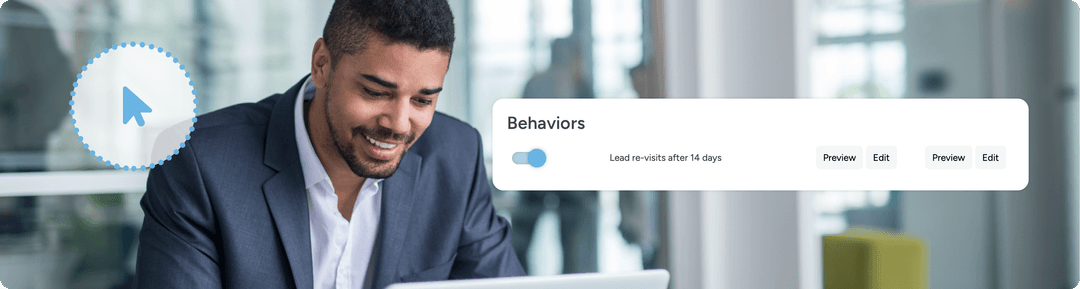
  • HOT leads signify a lead that has triggered 4 or more Behavioral Alerts: Learn More HERE
  • Behavioral Alerts are set up to trigger automation in your btPRO system. When leads perform some of these key actions, there are email and text responses set up to go out to ensure that the action does not go unacknowledged. The above article provides an overview of Behavioral automation, including how to turn this off and how to preview/edit the communication being sent out.

Where: Access your Smart CRM (the equivalent of Lead Central)

  • Use Smart Filter to find:
  • New, Prospect, and Active leads without running a Smart Campaign.
  • Smart Filters = Filters (Smart CRM Filters Overview)
  • Smart Campaign = Smart Drip (Smart Campaign Overview)
  • Verify that all New, Prospect, and Active leads are on a Search Alert.
  • Search Alert = e-Alert/listing alert (Search Alerts Overview)
  • Sort your leads by last visit and reach out to leads that have been on your site recently, but received no communication.
  • Check all of your Saved Smart Filters and utilize Mass actions as necessary.
  • Saved or Pinned Smart Filters = Smart Segments
  • Mass Actions = Bulk Actions (How to Apply Mass Actions)

Review your Business Analytics periodically throughout the week to check for leads that may have slipped through the cracks.

  • Identify Unengaged leads via BoldTrail Activity tab
  • Review percentage of calls and tasks completed

When it comes to learning the ins and outs of your new account be sure to check out:

Lead Generation Options

Lead Generation

Please note: If you are using BoomTown to manage your paid advertising campaigns, those will be paused the day before your BoomTown site is no longer available to the general public. You will be billed in arrears for the spend incurred prior to pause.

Experience the advantages of deploying a comprehensive strategy including top and mid-funnel marketing activities. A successful marketing package that includes Google and Facebook lead generation PLUS live concierge support to engage and qualify new leads in your pipeline.

Instantly boost listings on Facebook and Instagram to build your buyer pool, showcase your local expertise, and impress your buyers with digital marketing that drives real leads.

Keep your database growing with fresh leads each month by leveraging visually engaging, branded carousel ads, featuring multiple listings on Facebook and Instagram ads.

Billing

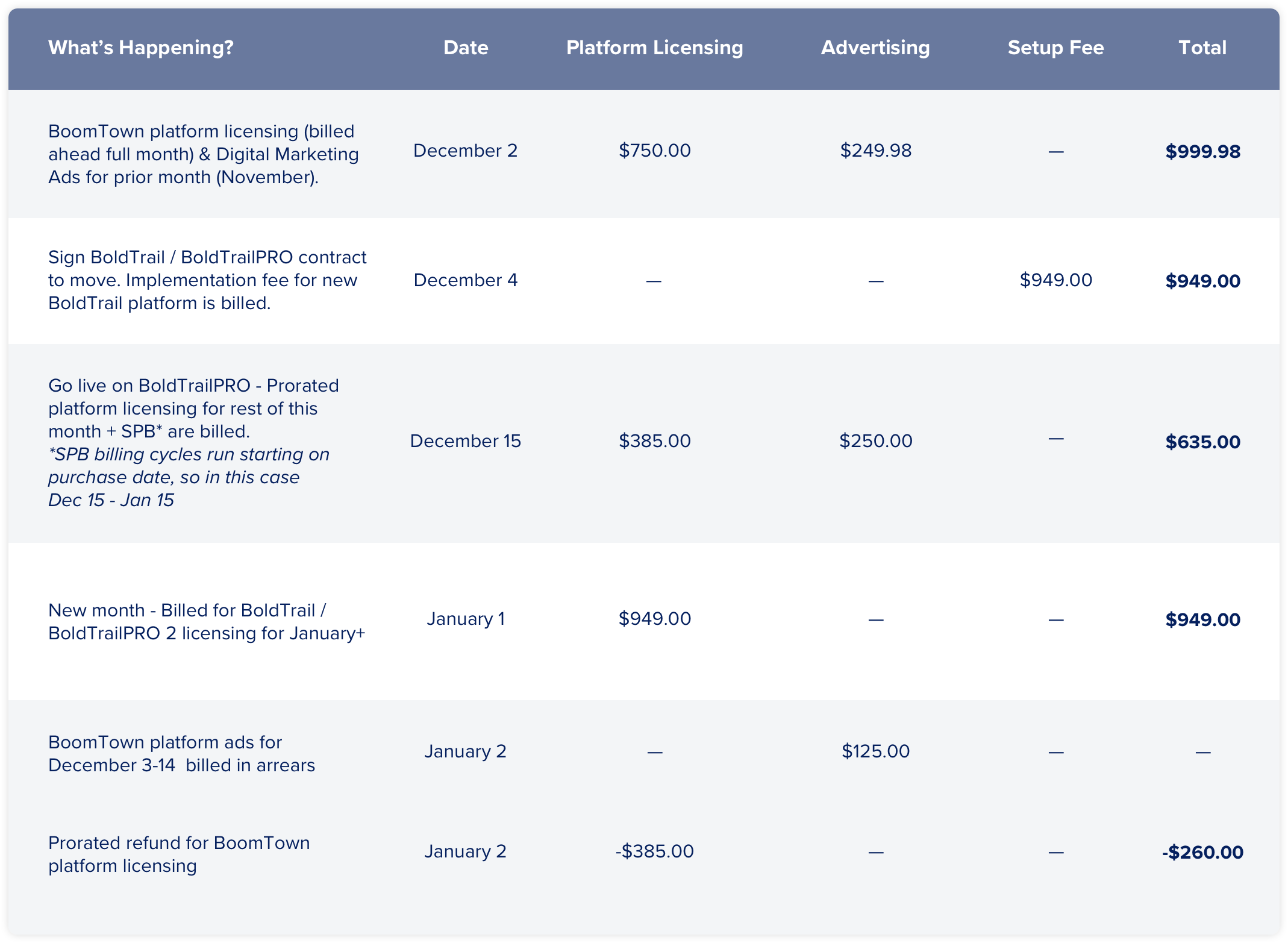
Your new platform and any lead generation services will be billed in advance, whereas your BoomTown platform fees were billed in advanced,  with lead gen billed in arrears. Not to worry though! Once your Innovation Pathway has been initiated, Billing will be reconciled between your BoomTown platform and your new account. Please view the matrix below to see how this works.

Note that this is an example, and your situation may look different based on your unique setup.

Resources

Click to Download

Feature List
Categories & Statuses
Laws of the Pipeline

BackOffice Demo Days – 2024 Jun

BackOffice Demo Days: Introducing BoldTrail

Speaker: Andy Hay
Account Executive with BackOffice

The next generation of Brokermint is here. Meet BoldTrail BackOffice.

Date: Thursday, June 27, 2024
Time: 8:00am PT (11:00am ET)

BoldTrail: A Bold New Brand for the Future

Meet BoldTrail, the next generation of kvCORE, Brokermint Solutions, and AmpStats. Bringing all our capabilities together into one seamless ecosystem, BoldTrail unites our extensive product portfolio under one dynamic brand. This powerful set of products and thriving community, provides all the insights, tools, and innovation you need to personalize your platform, differentiate your business, and scale success.

BoldTrail – Daily Onboarding Workshop

BoldTrail – Daily Onboarding Workshop

Welcome to BoldTrail Onboarding! We’re excited to work together to set up your account, provide access to the platform, and customize your settings for a successful launch.

BoldTrail Onboarding Workshop

Every Monday–Friday 9:00–10:00am PT (12:00–1:00pm ET)

Join our Implementation team every morning, Monday–Friday at 9am Pacific Time for a one-hour, live Onboarding Workshop. In this workshop headed by one of our Implementation Specialists:

  • We’ll review your account setup and readiness for launch
  • We will show you how to navigate through your dashboard and update settings
  • You will have the opportunity to ask any and all account configuration questions
Join in

Support

Our team is here to support you every step of the way for a smooth launch. Contact us via the following methods:

Email

start@insiderealestate.com

Daily Onboarding Workshop

Join our Implementation team for a live Onboarding Workshop Monday-Friday at 9am PT. Learn about BoldTrail setup topics and get live answers to any account configuration questions.

Chat

Engage with our team from the blue chat bubble from BoldTrail (bottom right corner) from 7:00am–4:00pm PT, Mon–Fri.

Frequently Asked Questions

When does billing begin?

Billing begins 14 days after your contract is signed

Use the chat feature in your BoldTrail account or email start@insiderealestate.com

When IDX has been approved, who can I get in touch with to activate my site?

Schedule into our DNS Launch Call

BoldTrail Onboarding

BoldTrail Onboarding

Welcome to BoldTrail Onboarding! We’re excited to work together to set up your account, provide access to the platform, and customize your settings for a successful launch. Your journey will consist of 6 steps:

1

Complete the Setup Wizard. Here is a short video tutorial.

  • Verify your information
  • Select the domain you want to use for your BoldTrail powered website
  • Submit the IDX request to add your MLS feed to the website
  • Select a Smart Number
  • Select your service areas (either all counties served by your MLS or more focused list of specific counties)

2

Our Implementation team will work on reviewing your website and account setup. Once your MLS(s) confirms that IDX access has been approved we will reach out to you to schedule your Launch Call. On the call we will…

  • Review your account
  • Take care of any edits you may have
  • Set your domain to point to our web servers. To do this we will need to access the registrar where you purchased your website domain (for example GoDaddy). Please have these credentials ready! We can either complete the launch steps for you or walk you through the changes in your registrar.

3

Now that your account is live you’ll want to send your agents the “Welcome Email” to invite them to your platform.

4

It’s time to import your contacts, power up automations, and generate new leads!

Support

Our team is here to support you every step of the way for a smooth launch. Contact us via the following methods:

Email

start@boldtrail.com

Daily Onboarding Workshop

Join our Implementation team for a live Onboarding Workshop Monday-Friday at 9am PT. Learn about BoldTrail setup topics and get live answers to any account configuration questions.

Chat

Get help from our Implementation Team via Chat by clicking on the Chat bubble at the bottom right of your account. We are available on chat from 7:00am–4:00pm PT, Mon–Fri.

Frequently Asked Questions

When does billing begin?

Billing begins on day 14.

Use the chat feature in your BoldTrail account or email stat@boldtrail.com

When IDX bas been approved, who can i get in tough with to activate my site?

Schedule into our DNS Launch Call

BoldTrail Pro Training Sessions

BoldTrail Pro Live Training Webinars

All of your questions – answered! Dive into BoldTrail Pro tips, tricks, and best practices with these Live Training Webinars.

The BoldTrail Pro Live Webinar series is designed to be progressive, with each session building upon the knowledge from previous ones. We highly recommend beginning with Day 1 and following the series sequentially until its conclusion.

BoldTrail Pro Training Session 1

MONDAYS at 10:00am PT / 1:00pm ET

Platform Overview & Contact Organization

Learning Objectives:

  • Understand what makes up the BoldTrail Platform
  • Know what your resources are for Training, Community & Support
  • Learn how to categorize your contacts and start organizing them with filters
Register

BoldTrail Pro Training Session 2

TUESDAYS at 10:00am PT / 1:00pm ET

Contact Management: The Reactive Approach

Learning Objectives:

  • Learn how leads register on your website
  • Identify best practices for locating and reaching out to new leads
  • Understand how to use the tools in BoldTrail to communicate with your leads
Register

BoldTrail Pro Training Session 3

WEDNESDAYS at 10:00am PT / 1:00pm ET

Contact Management: Proactive Outreach

Learning Objectives:

  • Listings to Contacts
  • Market Data to Contacts
  • Conversation- Starting Texts and Emails
Register

BoldTrail Pro Training Session 4

THURSDAYS @ 10:00am PT / 1:00 ET

Drive Contacts to Your Website & Grow Your Business

Learning Objectives:

  • Website Content for Lead Generation
  • Manage Squeeze Links, Text Codes, Landing Pages
  • Open House Registration with the Mobile App
Register

Looking for more training opportunities? Check out our BoldTrail Training Calendar for upcoming live and interactive eWebinars available to all BoldTrail PRO users.

View Calendar

BoldTrail BackOffice Training Sessions

BoldTrail BackOffice Live Training Webinars

All of your questions – answered! Dive into BoldTrail BackOffice tips, tricks, and best practices with these Live Training Webinars.

Introduction to BackOffice

Mondays & Wednesdays @ 12pm EST / 9am PST

By the end of this webinar, you’ll have a solid grasp of how to utilize the BackOffice system to its fullest potential, enhancing your productivity and ensuring smooth operations. Don’t miss this opportunity to elevate your back-office management skills!

Learning Objectives:

  • Understand the functionality of each main tab and its tools
  • Navigate the BackOffice interface with ease
  • Review Essential Elements such as Commission Plans, Checklists and Contacts
Register

BackOffice for Admins: Transactions & Checklists (1 of 3 Part Admin Series)

Tuesdays @ 12pm EST / 9am PST

By the end of this webinar, you’ll have an in-depth knowledge of how to effectively handle transactions in BackOffice, optimize checklists, and leverage MLS integration for maximum efficiency.

Learning Objectives:

  • Gain a comprehensive understanding of creating and managing transactions
  • Learn how to create, attach documents, and manage checklist settings
  • Explore the benefits of the MLS feed and how it integrates with your transactions
Register

BackOffice for Admins: Users & Permissions (2 of 3 Part Admin Series)

Wednesdays @ 12pm EST / 9am PST

By the end of this webinar, Admins will have a thorough understanding of how to create users and manage permissions effectively, ensuring a secure and organized BackOffice environment.

Learning Objectives:

  • Step-by-step guide on adding new users to the BackOffice system
  • Understand the hierarchy and scope of permissions to ensure security and proper access control
  • Delve into the nuances of permission settings
Register

BackOffice for Admins: Commission Plans and Basic Accounting (3 of 3 Part Admin Series)

Thursdays @ 12pm EST / 9am PST

By the end of this webinar, Admins will have a solid understanding of how to integrate accounting functions, manage commissions effectively, and handle agent payments with confidence.

Learning Objectives:

  • Overview of accounting integrations available in BackOffice
  • Learn the fundamentals of managing commissions within BackOffice
  • Explore the process of handling agent payments
Register

Internal Referral – Back Office to Front Office

Internal Referral: Back Office to Front Office

Referral should be an owner, broker, team leader, transaction coordinator, or other operations role. Not an agent.

Internal Referral – Front Office to Back Office

Internal Referral: Front Office to Back Office

Referral should be an owner, broker, team leader, transaction coordinator, or other operations role. Not an agent.