
Real Estate CRM With Mobile App: What “Full Access” Actually Means
Most real estate CRMs technically have a mobile app. The more relevant question is what the app actually does — because there’s a significant difference between a mobile app that pushes lead notifications and one that gives you genuine full CRM access from the field.
For agents who spend the majority of their working day outside an office — in showings, at listing appointments, driving between neighborhoods — the mobile experience isn’t a secondary feature. It’s the primary interface. A CRM that requires a desktop to do anything meaningful is a CRM that only works part of the time.
According to NAR’s 2024 Technology Survey, 72% of agents primarily use a smartphone for their business. That number means the mobile app isn’t a supplement to the desktop experience — for most agents, it is the experience.
What a Real Estate CRM Mobile App Should Do
Full lead management. When a new lead comes in, the app should let you see everything about that lead immediately — where they came from, what they’ve searched, what campaign they’re on — and let you take action directly: send a message, change their pipeline stage, assign a campaign.
Real-time lead alerts. Speed-to-lead matters more than almost any other conversion factor. The app should push immediate alerts when a new lead registers or when an existing contact returns to your IDX site — not a batched notification that arrives an hour later.
Contact communication. Calling, texting, and emailing contacts from within the CRM — not your phone’s native app — means the activity is logged automatically. If you call a lead from your phone’s dialer, there’s no record in your CRM. If you call from within the app, the interaction is part of the contact’s history.
Pipeline visibility. A clean view of your pipeline — who’s active, who needs follow-up today, who’s gone quiet — should be accessible from the app without navigating through desktop-style screens.
Campaign management. The ability to enroll a contact in a smart campaign, check campaign status, or pause outreach from your phone means you’re not accumulating a to-do list of CRM tasks to handle when you get back to a desk.
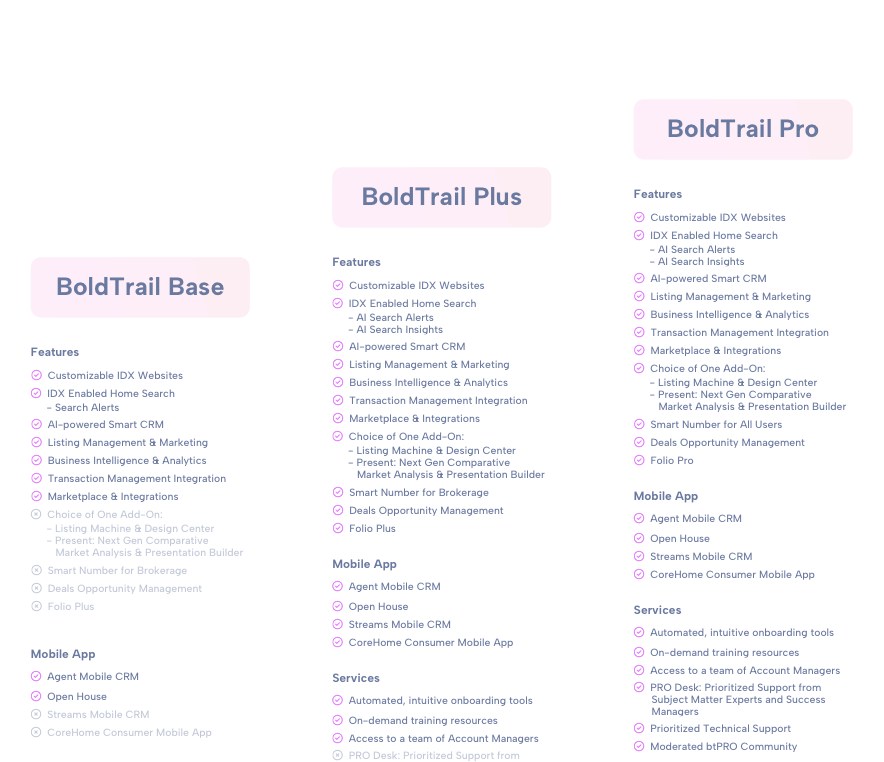
Flexible Packages– Configured Your Way for Your Unique Business.
Which package is right for me?
How BoldTrail’s Mobile App Works
BoldTrail’s mobile app provides full front-office CRM access — not a read-only or notification-only version of the desktop experience.
From the app, agents can:
For agents using BoldTrail’s Smart CRM, the mobile app surfaces behavioral data — a contact who has been actively searching your IDX site — in the same lead alert system, so high-intent activity doesn’t go unnoticed because you were in the field.
The app is also the primary interface for BoldTrail’s lead engine alerts: when a new lead comes in from a Google or Facebook campaign, the alert goes to the app immediately, with the lead’s information and source attached, so follow-up can begin within minutes.
The Real Cost of a Weak Mobile Experience
Agents who use a CRM with a limited mobile app tend to develop the same workaround: they triage notifications on their phone and handle CRM tasks in batches when they’re back at a desk. The problem with that workflow is timing — the leads who warranted fast follow-up have already waited hours by the time the agent catches up.
For internet leads in particular, follow-up delay is a conversion problem. The behavioral window where a new lead is most engaged — actively searching, mentally ready to talk to an agent — is short. A CRM that enables immediate response from wherever the agent is covers that window. One that requires a desktop to do anything meaningful doesn’t.

Q&A: Real Estate CRM With Mobile App
What should I look for in a real estate CRM mobile app?
Look for full contact management (not just notifications), real-time lead alerts with lead details attached, in-app calling and texting with automatic CRM logging, pipeline visibility, and the ability to assign or manage campaigns from your phone. An app that only sends notifications requires you to handle every substantive CRM task from a desktop — which creates delay for time-sensitive actions like new lead follow-up.
Does BoldTrail’s mobile app give full CRM access or just notifications?
BoldTrail’s mobile app provides full front-office CRM access — contact management, lead alerts with behavioral context, in-app communication with automatic logging, pipeline visibility, and smart campaign management. It’s designed as a complete field interface, not a notification layer on top of a desktop-only system.
How important is mobile access for real estate agents?
According to NAR’s 2024 Technology Survey, 72% of agents primarily use a smartphone for their business. For agents whose work happens primarily in the field — showings, appointments, prospecting — a CRM that’s functionally desktop-only means the system only works part of the time. Mobile-first access is a practical requirement for most working agents, not a preference.
Does using the CRM app vs. my regular phone for calls make a difference?
Yes, practically. When you call a contact from within your CRM app, the call is automatically logged in the contact’s record — including date, time, and duration. When you call from your phone’s native dialer, there’s no automatic record in your CRM. Over time, incomplete contact history makes it harder to understand where a relationship stands and what follow-up has already happened.
Which Package is Right For Me?
For agents whose business happens in the field, the mobile app is the CRM — full stop. If you want to see how BoldTrail’s mobile experience covers the real-world workflows of an active agent, explore the mobile app features or request a demo from the team.